Want to learn more about surgical guide planning?
Discover how digital workflows can improve your implant success rates.
Table of Contents
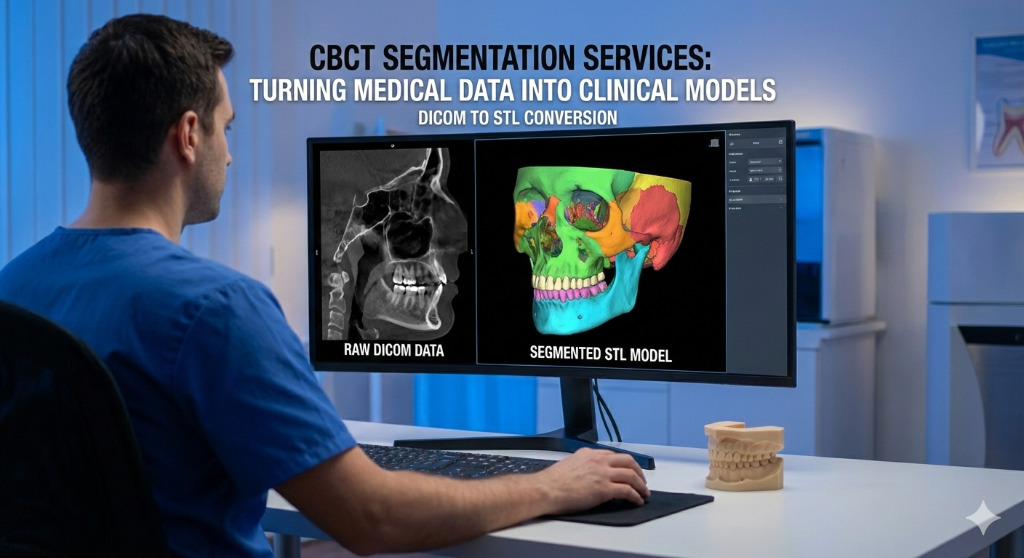
A CBCT scan contains an extraordinary amount of anatomical data — bone density, nerve paths, sinus boundaries, root morphology — all encoded in thousands of DICOM slices. But raw DICOM data is not directly usable for surgical planning or patient communication.
Digital Imaging and Communications in Medicine — the universal file format for medical imaging. CBCT scanners produce DICOM files that are imported into planning software for 3D reconstruction.
A 3D imaging technique that captures the jaw, teeth, and bone structure in a single rotational scan. It produces DICOM files used for implant planning, nerve mapping, and surgical guide design.
segmentation is the process of converting this raw medical data into clean, isolated 3D models (STL files) of specific anatomical structures. Each structure — teeth, bone, nerves, sinuses — becomes a separate, manipulable 3D object.
A 3D surface mesh file format used in dental CAD/CAM. Intraoral scanners produce STL files that capture tooth and gingival surfaces for surgical guide fitting.
What Gets Segmented?
Depending on the clinical need, we can isolate:
- Individual teeth — for autotransplant planning or orthodontic analysis
- Mandibular bone — for implant site evaluation and bone volume assessment
- Maxillary bone — including alveolar ridge and palatal vault
- Inferior alveolar nerve (IAN) — critical for safe implant placement in the posterior mandible
- Mental foramen — to avoid damage during surgery
- Maxillary sinuses — for sinus lift planning and assessing pneumatization
- Pathological findings — cysts, lesions, or foreign bodies
How the Process Works
- Upload your DICOM files securely through your SurgicalGuide.Pro dashboard
- We import into medical-grade software (typically with voxel-level precision)
- Threshold and manual refinement separates each structure from surrounding tissue
- Mesh optimization smooths artifacts without losing anatomical accuracy
- Export as STL — each structure as a separate, color-coded file
The entire process typically takes 24-48 hours, depending on case complexity.
Clinical Applications
Segmented 3D models serve multiple purposes:
- Implant planning — visualize available bone in 3D before placing virtual implants
- Surgical guide design — segmented nerve paths prevent dangerous drill trajectories
- Patient education — showing a 3D model is far more effective than explaining an X-ray
- Orthodontic treatment planning — root positions and bone boundaries inform bracket placement
- Pre-surgical communication —
Ready to streamline your surgical guide workflow?
Join 200+ dental professionals who trust SurgicalGuide.Pro for precision planning.